Configuration
Every setting has a default, so clankerwatch works without any configuration. You can change settings in four places, from most to least specific:
- A command-line flag, such as
--interval 10m. - An environment variable, such as
CLANKERWATCH_INTERVAL=10m. - The settings file,
~/.config/clankerwatch/config.yaml. - The built-in default.
A flag overrides its environment variable, which overrides the settings file. The daemon validates the result once, after combining all four.
The settings page
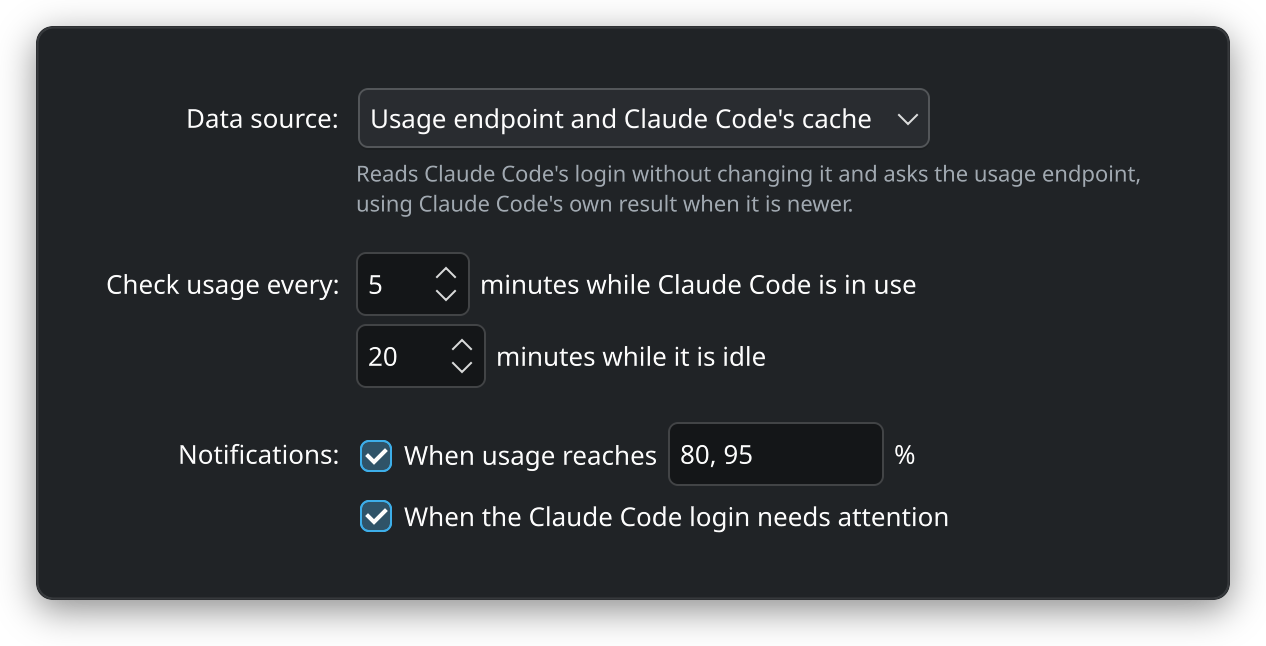
Right-click the widget and choose Configure Clanker Watch. The page changes the settings file for you:
| Control | Setting |
|---|---|
| Data source | mode: the usage endpoint and Claude Code’s cache, or Claude Code’s cache only |
| Check usage every … minutes while Claude Code is in use | interval, from the minimum of 2 up to 120 minutes |
| … minutes while it is idle | idleInterval, from the active interval up to 1440 minutes |
| Notifications: When usage reaches … % | notify, a comma-separated list of thresholds. Clearing the check box turns threshold alerts off |
| When the Claude Code login needs attention | notifyAuth |
| Settings file | The file the daemon reads, for reference |
Changes take effect when you press Apply or OK. The daemon writes them into config.yaml, keeps the file’s comments, and applies them at once without a restart. If the result does not validate, it restores the previous file and the page shows the error.
The page shows the daemon’s own view of the settings, so it needs the daemon to be running. While the daemon runs in demo mode, the page is read-only.
The settings file
The daemon reads $XDG_CONFIG_HOME/clankerwatch/config.yaml, which is ~/.config/clankerwatch/config.yaml by default. A missing file means defaults. Every key is optional, and an absent key keeps its default.
mode: hybrid        # or cache-only
interval: 5m        # polling interval while Claude Code is active, at least 2m
idleInterval: 20m   # polling interval while it is idle
notify: [80, 95]    # alert thresholds in percent, [] turns alerts off
notifyAuth: true    # alert when the Claude Code login needs attention
logLevel: info      # debug, info, warn or error
stateDir: ""        # default $XDG_STATE_HOME/clankerwatch
claudeConfigDir: "" # only when Claude Code runs with CLAUDE_CONFIG_DIR| Key | Default | Accepts |
|---|---|---|
mode | hybrid | hybrid or cache-only. See cache-only mode. |
interval | 5m | A Go duration, such as 5m or 90s. At least 2m. |
idleInterval | 20m | A Go duration, no shorter than interval. |
notify | [80, 95] | A list of percentages greater than 0 and at most 100. Order and duplicates do not matter. [] turns threshold alerts off. |
notifyAuth | true | true or false. |
logLevel | info | debug, info, warn, or error, in any case. |
stateDir | $XDG_STATE_HOME/clankerwatch | A directory for state.json. An empty string keeps the default. |
claudeConfigDir | Claude Code’s default | The directory Claude Code uses when you run it with CLAUDE_CONFIG_DIR. |
The file is read strictly. Unknown keys, duplicate keys, values of the wrong type, a second YAML document, and YAML anchors or aliases are errors that name the problem, so a typo never passes silently. A file holding only comments holds no settings.
Packages install a commented copy of every key as /usr/share/doc/clankerwatch/config.example.yaml. A source install with task install copies it to ~/.config/clankerwatch/config.yaml when that file does not exist.
Apply a hand edit
The daemon reads the file at startup and when it receives SIGHUP. The unit maps reload to SIGHUP, so after editing the file run:
systemctl --user reload clankerwatchThe daemon resolves the settings again, the same way it did at startup, and applies them without dropping its data or its backoff. If the edited file is invalid, it logs the error and keeps running with its current settings:
journalctl --user -u clankerwatch -n 20An invalid file at startup stops the daemon with exit status 2 and the same error in the journal.
Environment variables and flags
Each key has an environment variable and a flag:
| Key | Variable | Flag |
|---|---|---|
mode | CLANKERWATCH_MODE | --mode |
interval | CLANKERWATCH_INTERVAL | --interval |
idleInterval | CLANKERWATCH_IDLE_INTERVAL | --idle-interval |
notify | CLANKERWATCH_NOTIFY | --notify |
notifyAuth | CLANKERWATCH_NOTIFY_AUTH | --notify-auth |
logLevel | CLANKERWATCH_LOG_LEVEL | --log-level |
stateDir | CLANKERWATCH_STATE_DIR | --state-dir |
claudeConfigDir | CLAUDE_CONFIG_DIR | --claude-config-dir |
notify takes a comma-separated list in a variable or flag, such as 80,95. An empty value turns threshold alerts off.
CLANKERWATCH_CONFIG or --config reads a different settings file. A file named this way must exist, unlike the default file.
CLAUDE_CONFIG_DIR is the variable Claude Code itself reads. If you run Claude Code with it, give the daemon the same directory, either with the claudeConfigDir key or with the variable in a drop-in as shown below.
Set them for the service
systemd starts the daemon, so variables from your shell do not reach it. Add them with a drop-in:
systemctl --user edit clankerwatch[Service]
Environment=CLANKERWATCH_MODE=cache-only
Environment=CLANKERWATCH_LOG_LEVEL=debugThen restart the daemon, because a reload re-reads only the settings file, not the environment:
systemctl --user restart clankerwatchLocked keys
A key that an environment variable or flag sets is locked. The settings file cannot change it, and the settings page shows its control disabled with a note naming the source, such as “Set by an environment variable or command-line flag: Data source (CLANKERWATCH_MODE)”. The daemon also rejects a change to it over D-Bus.
To unlock a key, remove the variable or flag and restart the daemon. An empty CLANKERWATCH_STATE_DIR keeps the default directory and does not lock stateDir.
clankerwatch status shows which settings file the daemon reads and the values it resolved.
Cache-only mode
In cache-only mode the daemon never reads Claude Code’s credentials and never uses the network. It shows only the usage Claude Code cached in ~/.claude.json the last time it fetched usage itself, for example when you ran /usage. The bars can therefore be stale, and the footer tells you how old the data is.
Until Claude Code has cached anything, the widget shows “No usage data yet”. The daemon still watches the file and picks up each new cache within 2 minutes.
Use cache-only mode when you do not want any program other than Claude Code to use its login. Security explains the trade-off.
Alert thresholds
notify controls two things:
- Notifications. The daemon sends one desktop notification when a limit reaches each threshold, once per reset window.
- Bar colors. A bar turns to the warning color at the lowest threshold and to the critical color at the highest. With a single threshold, a bar goes straight to the critical color at it.
With alerts off (notify: []), no threshold notifications are sent and the colors use 80% and 95%. The usage endpoint also grades each limit itself, and a bar takes the more urgent of that grade and the thresholds.
Credit balances are shown but never alerted on.
notifyAuth controls the separate notification for a Claude Code login that has been signed out or rejected for 10 minutes.
Polling intervals
interval applies while Claude Code is in use, and idleInterval while it is not. Claude Code counts as in use when one of its session files changed in the last 10 minutes, or a session is busy in a running process.
The floor of 2 minutes protects the usage endpoint’s rate limit, which Claude Code shares. Shorter intervals rarely help: whenever Claude Code fetches usage itself, the daemon picks up that result for free. How it works describes the full schedule.